Adding tags dynamically from a parent form using Stimulus, requestjs, and Turbo Streams
The Problem
I have a recipe app where a recipe can have many tags. Adding a tag to a recipe is done via the recipe’s edit page. If the user needs to add a new tag, they have to leave the recipe form, create a tag in a separate CRUD workflow, then come back to the recipe form to add it. This is not an ideal workflow.
The Solution
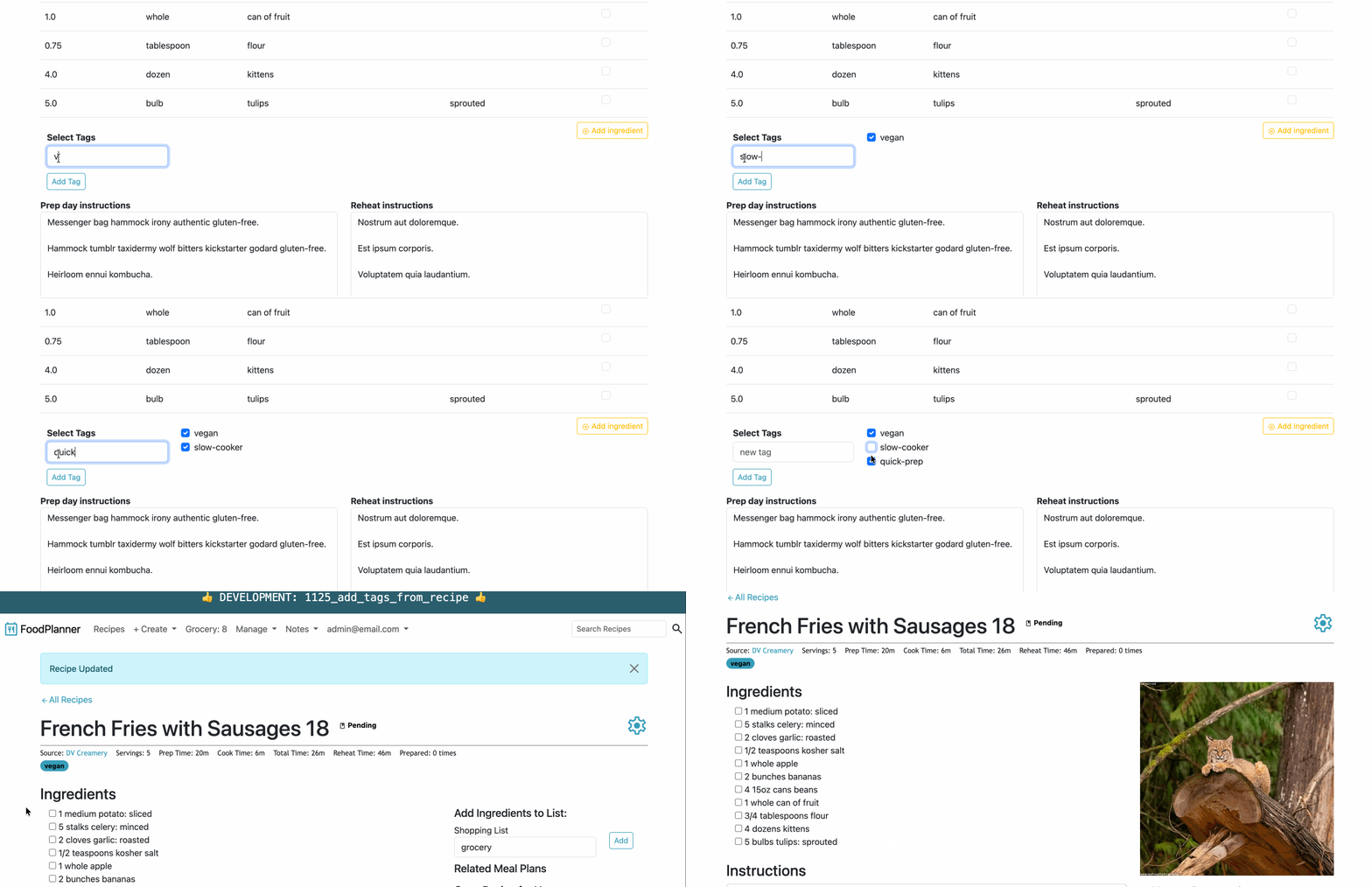
The solution I chose is to add the new tag option to the recipe form dynamically via a turbo stream. I did the work for this feature in this PR. This is what the implementation it looks like:
How it Works
- The user types a new tag name into a simple
inputfield on the recipe form. - Clicking the “Add Tag” button or just hitting enter in the input field triggers the
createTagStimulus function. - The Stimulus controller uses the
requestjs-railsgem to initiate a Turbo StreamPOSTrequest to theTagsController#create. - I expanded the
TagsController#createaction to handle a Turbo Stream response (new workflow) in addition to the current HTML workflow. - Lastly, the
create.turbo_stream.erbis rendered which appends the new checkbox for the new tag to the DOM.
The Details
First of all, it is invalid HTML to have a <form> tag within a <form> tag. In addition, this would cause conflicts with submitting the parent recipe form. This is an example of an invalid HTML form:
<!-- This does not work -->
<form action="/recipes" method="post">
  <form action="/tags" id="tag-creation" method="post">
    <input type="text" name="tag[name]" form="tag-creation">
    <button form="tag-creation">Add tag</button>
  </form>
  <button>Save Recipe</button>
</form>
So having a tags <form> inside the recipe <form> that submits to a Turbo Stream is off the table for this scenario. There are a couple of solutions that I have seen implemented most recently:
- use Stimulus to trigger the action (what this post explains)
- build a tags form outside of the recipes form and trigger the tags form submit from within the recipes form (what this refactor post explains)
I chose to implement option #1 because I wanted practice (and an example to reference in my codebase) using the requestjs-rails gem. And, to be honest, I forgot about option #2 until a friend reminded me after I had already implemented #1. 😂 C’est la vie!
So on to option #1!
The tricky part about this from-inside-a-form problem is converting that DOM click to a Turbo Stream in the Stimulus controller.
Fortunately, this scenario is pretty common in Rails development, so there are gems to help us out. I chose to use the requestjs-rails gem because it’s heavily used and has good support. Please see the gem docs for installation instructions.
I created a Stimulus controller called inline_tag_creator_controller to handle this behavior. You’ll see below that it has a target to easily identify the tag name <input> field. Also, instead of fussing about hardcoding the path to the TagsController#create action here in the javascript, we can take advantage of a Stimulus value to just pass it in from the recipe form view where we have access to route helpers. The requestjs-rails gem magic happens with the await post(); line where we can pass it the info from the DOM and specify a "turbo-stream" response.
// app/javascript/controllers/inline_tag_creator_controller.js

import { Controller } from "@hotwired/stimulus"
import { post } from "@rails/request.js"

export default class extends Controller {
  // Easily identify the `input` field to grab its contents
  static targets = ["input"]
  // Easily receive the destination url from the view
  static values = { url: String }

  async createTag(event) {
    event.preventDefault()

    const name = this.inputTarget.value.trim()
    if (!name) return

    // The requestjs-rails gem has a handy `post` function to handle posts
    // and we're specifying a turbo stream response
    const response = await post(this.urlValue, {
      body: { tag: { name } },
      responseKind: "turbo-stream"
    })
  }
}
There is nothing special about the way the input field is wired up to Stimulus inside the recipe form, so all of this should look pretty standard. Hooray! The Stimulus controller is initialized at the top level where it is needed. We can easily pass in that tags_path as a Stimulus value in that line as well.
When the user submits the tag name, I wanted the <input> field to be cleared, so I pulled it into a partial so it can be rendered from the Turbo Stream later. This is what it looks like:
<!-- app/views/recipes/_form_new_tag_field.erb -->

 <%= tag.input(
    type: "text",
    <!-- Since we're using a Turbo Stream to replace this DOM element, it gets an id -->
    id: "js_recipe_form_new_tag_field",
    placeholder: "new tag",
    class: "form-control",
    data: {
            <!-- Identify the input target for the Stimulus controller -->
            inline_tag_creator_target: "input",
            <!-- Trigger the createTag function on enter -->
            action: "keydown.enter->inline-tag-creator#createTag"
          },
    autocomplete: "off"
) %>
This partial uses a Stimulus target to identify the <input> field. Technically, I could have identified this input field using the same js_recipe_form_new_tag_field DOM id that the Turbo Stream is using, but I wanted practice using a Stimulus target. Lastly, the field has a Stimulus action assigned which triggers the createTag function on enter.
Now back to the recipe form, since hitting enter in an input field is not always an obvious workflow, I also included a button that triggers the createTag function on click. Then in the list of checkbox options, I assigned a couple of ids so the Turbo Stream can target the right elements after the POST is processed and the new tag is created.
<!-- app/views/recipes/_form.html.erb -->

<%= form_with(model: recipe) do |form| %>
  <%= form.label :title %>
  <%= form.text_field :title %>
  ...
  <!-- Initialize the Stimulus controller and pass it the url value -->
  <%= tag.div(data: {controller: "inline-tag-creator", inline_tag_creator_url_value: tags_path} ) do %>
    <p>Select Tags</p>
    <!-- Using this tag input partial lets the Turbo Stream swap it out with a fresh blank one after the new tag is created -->
    <%= render partial: 'form_new_tag_field' %>
    <!-- Since we're using a Turbo Stream to update this DOM element, it gets an id -->
    <div id="js_inline_tag_error"></div>
    <!-- As a second submission option, trigger the createTag function on button click -->
    <%= tag.button(type: "button", data: { action: "click->inline-tag-creator#createTag" }) do %>
      Add Tag
    <% end %>

    <!-- Since we're using a Turbo Stream to append to this DOM element, it gets an id -->
    <div id="js_recipe_tags_list">
      <%= form.collection_check_boxes :tag_ids, tags, :id, :name do |r| %>
        <%= r.check_box class: 'form-check-input' %>
        <%= r.label class: 'form-check-label' do %>
          <%= r.object.name %>
        <% end %>
      <% end %>
    </div>
  </div>
<% end %>
The Turbo Stream has some conditional logic to append the new tag input and clear the error message (if present) if the tag was successfully created. Otherwise, it displays the error message.
<!-- app/views/tags/create.turbo_stream.erb -->

 <% if @tag.persisted? %>
  <%= turbo_stream.append "js_recipe_tags_list" do %>
    <div>
      <%= tag.input(
          type: "checkbox",
          class: "form-check-input",
          name: "recipe[tag_ids][]",
          id: "recipe_tag_ids_#{@tag.id}",
          value: @tag.id,
          checked: true) %>
      <%= tag.label(for: "recipe_tag_ids_#{@tag.id}", class: "form-check-label") do %>
        <%= @tag.name %>
      <% end %>
    </div>
  <% end %>
  <!-- Clear the error message div -->
  <%= turbo_stream.update "js_inline_tag_error", "" %>
  <!-- Replacing the input field clears the value that the user entered -->
  <%= turbo_stream.replace "js_recipe_form_new_tag_field", partial: '/recipes/form_new_tag_field' %>
<% else %>
  <!-- Display error messages in case of error on create -->
  <%= turbo_stream.update "js_inline_tag_error" do %>
    <%= @tag.errors.full_messages.to_sentence %>
  <% end %>
<% end %>
This approach continues to be Railsy because we get to take advantage of more built-in Rails functionality by using a respond_to block in the TagsController#create to accept both the HTML and Turbo Stream response types:
# app/controllers/tags_controller.rb

class TagsController < ApplicationController
  ...

  def create
    @tag = current_user.tags.new(tag_params)

    if @tag.save
      respond_to do |format|
        # Handles the happy path for the regular CRUD workflow
        format.html { redirect_to tags_url }
        # Handles the happy path for the new turbo stream workflow
        format.turbo_stream
      end
    else
      respond_to do |format|
        # Handles the error path regular CRUD workflow
        format.html { render :new, status: :unprocessable_entity }
        # Handles the error path new turbo stream workflow
        format.turbo_stream { render status: :unprocessable_entity }
      end
    end
  end

  private

  def tag_params
    params.require(:tag).permit(:name)
  end
end
And that’s it. This solution gets to flex a lot of native Rails behavior with just a tiny gem wedged in there for the Stimulus-to-Turbo-Stream workflow. So we’re able to pull off something that is annoyingly tricky with a relatively simple solution.
The End…
Well, actually, it’s not. 😂 After writing this post and then messing around with option #2 (build a tags form outside of the recipes form and trigger the tags form submit from within the recipes form), I decided to refactor. You can read about it in this follow-up refactor post.