Search and Select an Item in a Shopping List using Turbo and Stimulus
I have a recipe app with a grocery shopping list where I can add items to it in bulk from a recipe and remove items individually as I shop for them at the store. My approach in building this app has been to keep everything as simple as possible and then add in complexity over time. I find this approach works well because then I’m not building out complex features that I don’t end up using. That said, this list feature has been technically quite simple but from a user experience not nearly simple enough and for way too long. So I shined it up with Turbo and Stimulus and released the whole feature with this PR.
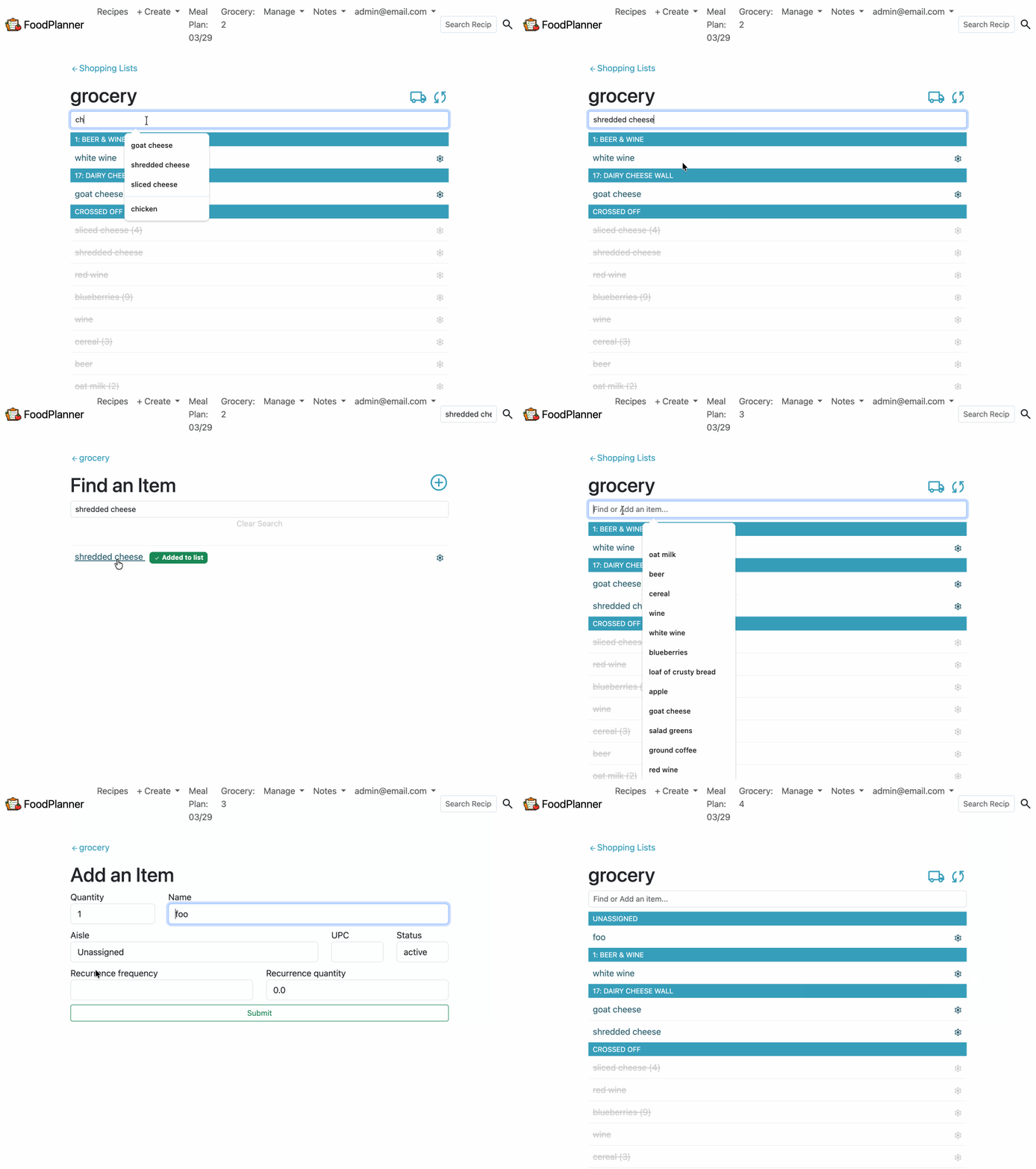
Here is the behavior before:
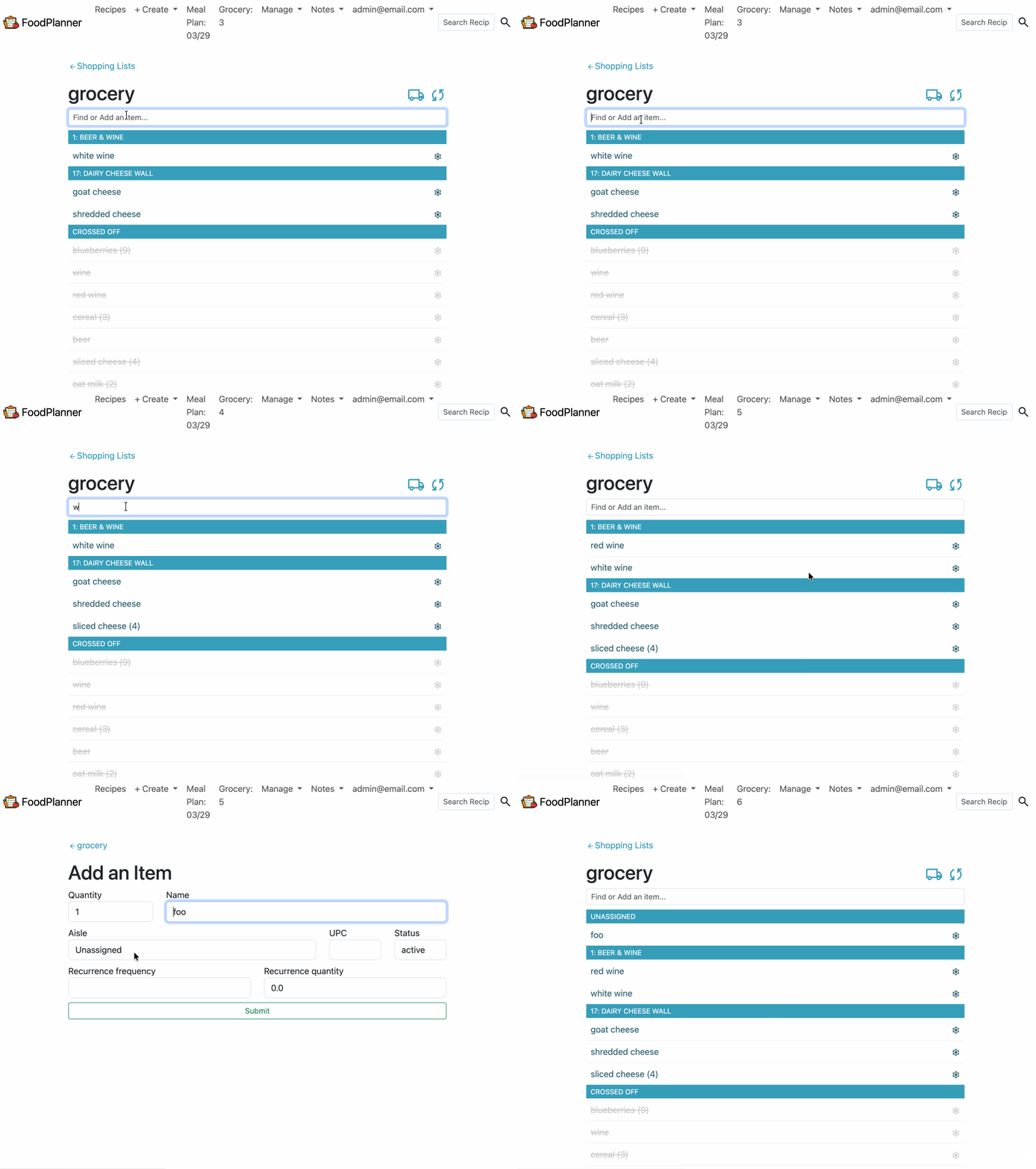
Here is the Turboified behavior after:
Architecture Context
The application was born in Rails 5, had several upgrades over the years, but only recently was updated to the latest Rails version of 8.1.2 at the time of this work.
A shopping_list_item belongs to a shopping_list and an aisle. An item appears under its aisle on the list.
When an item is active, it appears in the top section of the list. Clicking on it deactivates it and moves it to the inactive section of the list where it is grey and crossed off. Clicking on a deactivated item, toggles it back to active, removing it from the inactive section and putting it in the active section.
The Original Implementation
The original implementation was straight Rails CRUD (with a smidge of javascript). I was using an HTML <datalist> with all of the list’s items prepopulated. This allowed for simple filtering as the user typed because that functionality is baked-in to the HTML <datalist>.
<!-- app/views/shopping_lists/show.html.erb -->

<datalist id="name">
  <option value="  "></option>
  <% @shopping_list.items.each do |item| %>
    <option id="<%= item.id %>" value="<%= item.name %>"></option>
  <% end %>
</datalist>
Once the item was selected, the user then had to manually submit the form by hitting enter. This initiated a GET request to the ShopplingListsController#search action which rendered the search.html.erb page. The user then selected one of the search results which was a POST to ShoppingListItemStatusesController#activate_from_search, updating the item’s status to active. The controller action then implicitly rendered the shopping_list_item_statuses/activate_from_search.html.js which used javascript to render a “item added” badge next to the item on the page. The user then clicked a link to GET back to the list’s show.html.erb page. While the activate_from_search.html.js was converted to a activate_from_search.turbo_stream.erb in the Rails 8 upgrade, it was still the same workflow and user experience.
It was clunky. It was annoying. It was time to upgrade.
Building the Turbo Implementation
The new user workflow needed to be simpler. I wanted to see the search results on the list page and to be able to add items from those results without ever leaving the list show page. I also wanted to keep workflow for creating a new item on its own page. Now with access to some sweet Turbo tools like frames, streams, and Stimulus, I could get this behavior going pretty easily.
Step 1: Show search results on the show page
In order to have search results appear instantly while a user’s keystrokes filtered down the options, I reached for a Turbo frame and a Stimulus controller. The new technical flow is:
- User types in the search box
- Every keystroke triggers the Stimulus
search#submit, which debounces 300ms then submits the form - The form url submits a
GETrequest tosearch_shopping_list_path - The controller action responds with a Turbo frame matching the Turbo frame placeholder on the show page
- Only that frame’s content is swapped in — showing matching items below the search box without a full page reload
This little chunk of view code pulls all of the technologies together. Let me break it down for you.
<!-- app/views/shopping_lists/show.html.erb -->

01 <%= tag.article(id: dom_id(@shopping_list, :item_search_form)) do %>
02   <%= form_with(url: search_shopping_list_path(@shopping_list),
03                 method: :get,
04                 id: 'search-form',
05                 data: { controller: "search", turbo_frame: dom_id(@shopping_list, :search_results) }) do %>
06     <div class="col-xs-12">
07       <%= text_field_tag :search, nil,
08           placeholder: 'Find or Add an item...',
09           class: 'form-control form-control-sm',
10           autocomplete: 'off',
11           data: { search_target: "input", action: "input->search#submit" } %>
12     </div>
13   <% end %>
14   <%= turbo_frame_tag dom_id(@shopping_list, :search_results), target: "_top" %>
15 <% end %>
The Stimulus piece works like this:
- Line 5: The form’s
data: { controller: "search" }: mounts an instance of the Stimulussearch_controller.json this<form>element, giving the form and its child elements access to this controller’s actions. - Line 11: The text input’s
data: { search_target: "input" }: registers this HTML element as theinputTargetin the Stimulus controller. If you’re not familiar with Stimulus targets, this is just a fancy way of identifying DOM elements in a javascript function. (See the Stimulus docs about targets.) - Line 11: The text input’s
data: { action: "input->search#submit" }: calls the Stimulus functionsearch#submiton every keystroke. It’s reminiscent of the vanilla JSaddEventListener("input", search())approach. - Line 11: The
search#submitportion calls thesubmitfunction that’s defined in thesearchStimulus controller. This function debounces (pauses) the call by 300ms, then callsthis.element.requestSubmit()— wherethis.elementis the<form>itself. - The end result is the form is submitted without a page reload.
// app/javascript/controllers/search_controller.js
import { Controller } from "@hotwired/stimulus"

export default class extends Controller {
  static targets = ["input"]

  connect() {
    this.timeout = null
  }

  submit() {
    clearTimeout(this.timeout)
    this.timeout = setTimeout(() => {
      this.element.requestSubmit()
    }, 300)
  }
}
The Turbo frame piece works like this:
- Line 2: When the form is submitted, it hits the
search_shopping_list_path(@shopping_list)path. - Line 5: The form’s
data: { turbo_frame: dom_id(@shopping_list, :search_results) }tells Turbo that when this form submits, the response should be scoped to only the Turbo frame with that ID and not the the whole page. - When the form hits the
ShoppingListsController#searchaction, it gets the search results data and then responds via Turbo frame by rendering the inner contents of the partner “response” Turbo frame with the matching dom id in theapp/views/shopping_lists/search.html.erbview. - Line 14: The list show page’s empty
<%= turbo_frame_tag dom_id(@shopping_list, :search_results), target: "_top" %>just below the form is the partner “navigation” Turbo frame where the results will be populated.
# app/controllers/shopping_list_item_statuses_controller.rb

class ShoppingListsController < ApplicationController
  before_action :set_shopping_list, only: %i[search]

  def search
    search_term = params[:search]&.strip&.squish
    # Responds implicitly with HTML that contains a Turbo frame with the matching dom_id
    @shopping_list_items = @shopping_list.search_results(search_term)
  end
  ...
end
And the related Turbo frame with the search content:
<!-- app/views/shopping_lists/search.html.erb -->

<!-- See the matching dom_id here? -->
<%= turbo_frame_tag dom_id(@shopping_list, :search_results) do %>
  <div class="search-results">
    <% if @shopping_list_items.present? %>
      <section id='searched-items'>
        <% @shopping_list_items.by_recently_edited.each do |item| %>
          <%= render partial: '/shopping_list_items/item', locals: { item: item, destination_path: activate_from_search_shopping_list_item_path(item) } %>
        <% end %>
      </section>
    <% elsif params[:search].present? %>
      <p>Sorry, there are no results matching <strong>"<%= params[:search] %>"</strong></p>
      <%= link_to 'Create New Item', new_shopping_list_shopping_list_item_path(@shopping_list, search_term: params[:search]), class: button_classes('primary btn-block mt-3') %>
    <% end %>
  </div>
<% end %>
Why did I use a Turbo Frame instead of a Turbo Stream?
- The form is making a
GETrequest and Turbo Streams conventionally pair with POST/PATCH/DELETE (form submissions with side effects). You can force streams over GET, but it’s awkward. - Rendering search results is only updating one thing on the page. Streams can do that too. But we tend to use them when we need to update multiple things.
Step 2: Click search result item to activate on list
It seems like an item is just activated on the list, but several changes need to happen to the UX:
- Clear the search value from the input field
- Clear the search results from the top of the page
- Remove the item from the inactive section of the list
- Add the item to the proper aisle in the active section
- Update the item count in the nav bar list item
The original (legacy) implementation was using a basic respond_to :js, so my first approach was just converting that same workflow into a Turbo stream. This meant manually updating all of those items via dom_ids. But that felt so silly! Essentially, I was touching every part of the page, so it made more sense to let Turbo do its regular page load behavior of swapping out the body with the new content. So the ShoppingListItemStatusesController#activate_from_search changed to a regular redirect_to.
# app/controllers/shopping_list_item_statuses_controller.rb

class ShoppingListItemStatusesController < ApplicationController
  def activate_from_search
    @shopping_list_item.activate! unless @shopping_list_item.in_cart?
    redirect_to shopping_list_url(@shopping_list_item.list)
  end
end
This is why the target: "_top" is so important in the show page’s empty Turbo frame <%= turbo_frame_tag dom_id(@shopping_list, :search_results), target: "_top" %>. By default, any links initiated from within this frame (i.e. the “activate” links for each item and the “create a new item” link) are scoped to the frame. If you want to actually load a new page, you have to break out of the Turbo frame with a target: "_top". You don’t have to do it this way. Instead, you could set a target: "_top" on any appropriate link inside the frame if you choose. I chose to do it this way. Either way, the redirect_to will not work correctly without the target: "_top" on the link if it is inside of a Turbo frame.
Oddly enough, the turbo frame in the search.html.erb file does not need target: "_top" because it is the response frame. The target attribute only matters on the frame that actually lives in the browser. The response frame is just a wrapper Turbo uses to locate the right content to transplant.
A little more explanation on the purposes of the two frames:
- the
show.html.erbnavigation frame: the empty placeholder frame that lives on the page. It’s the persistent container. Settingtarget: "_top"here will have make any link rendered inside it (search results, “Create New Item”, etc.) break out to the top page. - the
search.html.erbresponse frame: in the server response HTML, it exists purely as a matching source HTML for Turbo to extract content from. Turbo finds it by ID, pulls out its inner HTML, and uses it to fill the placeholder frame in the navigation from onshow.html.erb. Once that swap happens, the response frame itself is discarded — it never persists in the DOM, so any target attribute on it would be irrelevant.
In Summary
I now have a feature that works so much more smoothly as a user experience. Hooray! I was able to replace a simpler CRUD + legacy javascript workflow with shiny new Stimulus and Turbo solutions. And they work like this:
- The search form uses Stimulus to autosubmit when a user enters keystrokes
- The search results are rendered in the content of a Turbo frame
- The links inside the results Turbo frame are allowed to break out of the frame to load a whole page body
- All content on the screen is updated after the server-side updates are made